PANASONIC CF-WEB184 Mobile Docking Station
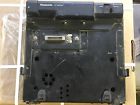
( Brand: Panasonic ), ( Manufacturer Part Number: CF-WEB184 ), ( Part Type: Docking Mobile Station )
Review PANASONIC Mobile Computer Docking Station
The Panasonic CF-Web184 Mobile Docking Station is a versatile and high-performance accessory designed to enhance the functionality of your Panasonic Toughbook CF-Series laptop. This docking station offers a seamless and secure connection between your laptop and external devices, providing a reliable workspace solution for both office and field environments.
The CF-Web184 features a robust and durable design, with a sturdy aluminum construction that ensures long-lasting performance. It offers a wide range of connectivity options, including USB 3.0, HDMI, VGA, and Ethernet ports, allowing you to connect multiple peripherals such as monitors, printers, scanners, and other devices. The docking station also supports high-speed data transfer and charging, ensuring that your laptop is always fully charged and ready to use.
One of the standout features of the CF-Web184 is its dual-monitor support, which allows you to extend your laptop's display onto an external monitor for increased productivity. The docking station also includes a built-in Ethernet switch, which allows you to connect multiple Ethernet-enabled devices to the same network, making it easy to share files and collaborate with colleagues.
The CF-Web184 is designed with ease of use in mind, with a simple and intuitive interface that allows you to quickly and easily configure your settings. It also includes a lock slot, which helps to prevent unauthorized access to your laptop and its connected devices.
In summary, the Panasonic CF-Web184 Mobile Docking Station is a must-have accessory for anyone who relies on their Panasonic Toughbook CF-Series laptop for work. Its robust design, wide range of connectivity options, dual-monitor support, and built-in Ethernet switch make it an ideal solution for both office and field environments. With its simple and intuitive interface, the CF-Web184 is easy to use and ensures a reliable and productive workspace.
Pros of buying CF-W184 Panasonic Mobile Docking Station:1. Compatibility: The CF-W184 is compatible with various Panasonic Toughbook CF-series laptops, providing a flexible solution for users who need to use multiple devices.
2. Ports: The docking station offers a wide range of ports, including USB 3.0, HDMI, and VGA, allowing for easy connection to peripherals and external displays.
3. Durability: Panasonic is known for its durable products, and the CF-W184 is no exception. It is built to withstand rough handling and harsh environments, making it an ideal choice for field workers and other mobile professionals.
4. Ergonomic design: The docking station has an ergonomic design that allows users to easily adjust the height and angle of the monitor, reducing strain on the neck and eyes.
Cons of buying CF-W184 Panasonic Mobile Docking Station:1. Cost: The CF-W184 is a premium product, and its price tag may be prohibitive for some users.
2. Limited connectivity: While the docking station offers a wide range of ports, it does not support wireless connections such as Wi-Fi or Bluetooth, which may be a deal-breaker for some users.
3. Size and weight: The docking station is large and heavy, which may make it difficult to transport, especially for users who travel frequently.
Conclusion:The CF-W184 Panasonic Mobile Docking Station is a high-quality product that offers a wide range of features, including compatibility with various Panasonic Toughbook CF-series laptops, a wide range of ports, and durability. However, its high cost, limited connectivity, and size and weight may be drawbacks for some users. Ultimately, the decision to buy the CF-W184 depends on the user's specific needs and budget.
Recommendation:If you are a mobile professional who needs a durable and versatile docking station that can handle rough handling and harsh environments, the CF-W184 is a great option. Its wide range of ports and ergonomic design make it an ideal choice for users who need to connect to multiple peripherals and adjust the monitor angle for comfort. However, if cost is a concern or if you require wireless connectivity, you may want to consider other options.
Details:
part #: cfweb184 price
- $95.99
specifications radiparaccessori:
- brand: Panasonic
- mpn: Cf-web184
- part type: Docking Mobile Station
General radiparaccessori:
- in stock: Yes
- consumer electronics > radio communication > partsaccessories > other parts accessories
- condition: For parts or not working
Seller radiparaccessori:
- city: Osceola, Nebraska
- zipcode: 68651
Payments radiparaccessori:
- PayPal
Ratings:
- As described with great price and quick delivery 03-12-18
- Great Sign, As Described, Thank You 03-13-18
- 5 fast shipping,good price, as described. 04-01-18
- Thank you for an easy, pleasant transaction. Excellent buyer.. 04-08-18
- As expected. 04-02-18
Shipping radiparaccessori:
- type: Flat
- handling: 3 days
- cost: $18.0
Offer radiparaccessori:
- bids: 0
- Started: April 17, 2018, 10:14 am
- best offer: false
- quantity: 5
- Sold: 0
Returns radiparaccessori:
- policy: no returns